Menu Shop CheMangi

Your menu.
From phone to display.

One catalogue to showcase what you make. Guests browse it online, you bring it to your venue’s screens and organise products, ingredients and prices in Menu Shop.

Get started with CheMangi Explore Menu Shop

Free registration. Menu Shop and other modules are activated according to your chosen plan.

Illustrative setting and interfaces.

Ingredients and recipes

Organised information behind every dish.

  1. Define ingredients

    Record the name, unit of measure and unit cost in Menu Shop’s ingredient records.

  2. Build the recipe

    Link ingredients to a product and enter quantities. The recipe supplies the ingredient cost calculation.

  3. Review prices and costs

    See recipe cost, additional product cost, cost as a share of price and gross margin calculated from the values entered.

  4. Keep information current

    Maintain ingredients, descriptions and allergen associations. Check what guests can actually see in each channel.

Listini Display

A screen that works with your menu.

From a fixed price board to a sequence of menus and promotions: choose how to present your offering and when content appears.

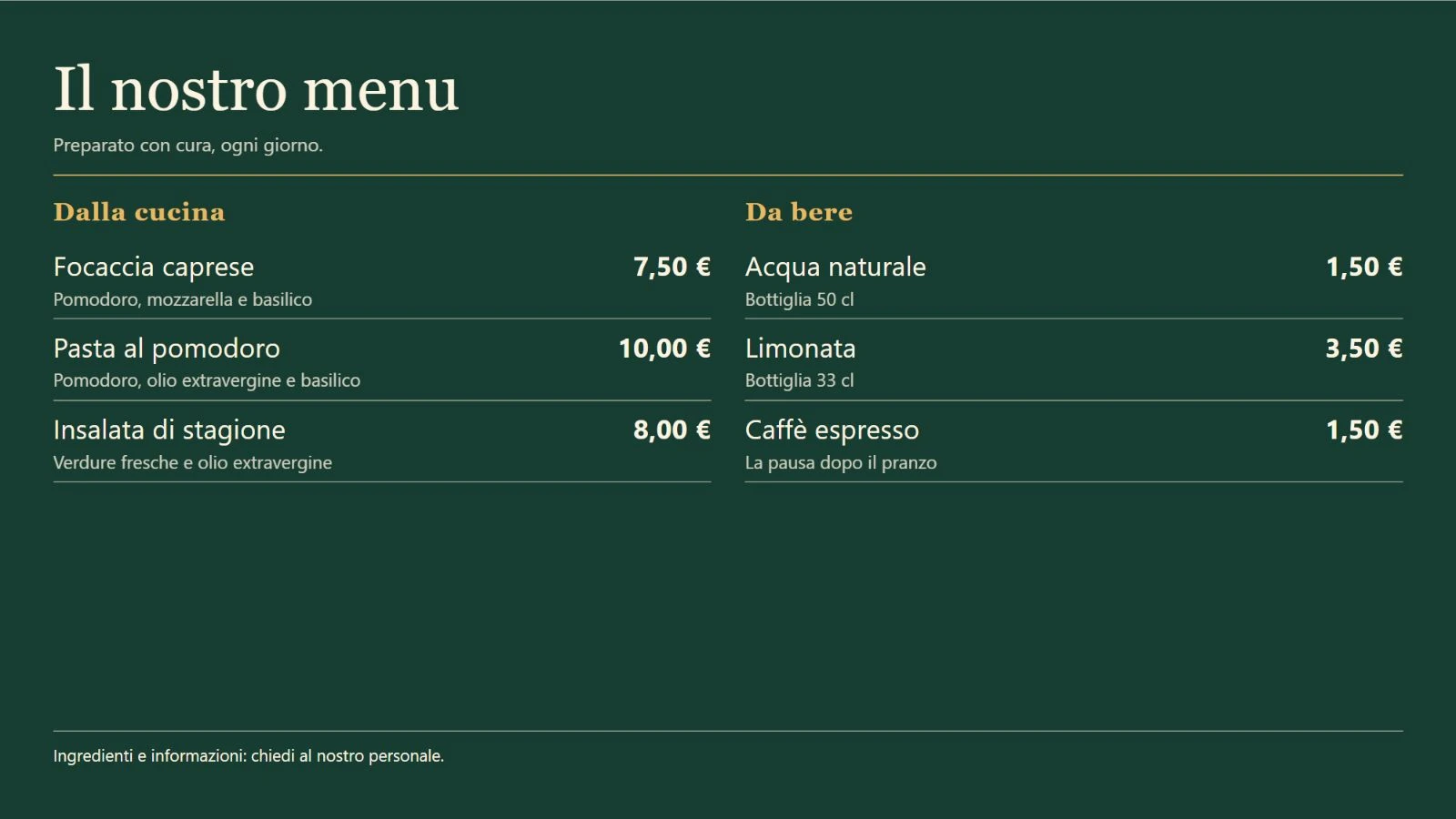
Actual Listini Display renderer with demonstration dishes and prices
Actual display renderer with demonstration data. Screenshot in Italian; content uses the language configured by the venue.

Landscape or portrait

Set the format, columns and categories per column or slide. The menu splits into pages when space runs out.

Your venue’s style

Customise logos, fonts, colours, backgrounds and descriptions. Save reusable graphic templates within your shop.

Menus, images and videos

Alternate the price board with promotional content. A shared library lets you reuse a slide on several displays in the same shop.

Your choice of timing

Set the order, duration, dates, weekdays and time slots for each step in the sequence.

Draft, then publish

Configuration changes remain private until published. Online, the display checks content at the configured interval and reads current catalogue prices.

Continuity offline

After the first online opening and successful save, a compatible browser retains the last saved content and media, even after reopening. Updates arrive when the connection returns.

Open the link on the device and check the Status panel for offline storage. TV, compatible browser, automatic startup and kiosk mode must be checked separately.

Menu Shop and inventory

From dish to stock: each record has a role.

A tomato can be a recipe ingredient and a purchased raw material. These records have different roles: matching names alone do not create an inventory link.

Recipes measure cost

Menu Shop multiplies recipe quantities by the unit costs entered. This is an estimate based on data maintained by the venue, without automatic updates from inventory purchase prices.

Inventory follows stock

The dedicated module manages items, suppliers, goods receipts, stock issues and movements. Menu Shop recipes alone are not a bill of materials linked to raw stock: browsing a menu or updating a display does not deduct ingredients.

Vetrina follows the counter

Where enabled, Vetrina counts displayed finished products, replenishments, returns, waste and estimated sales by difference. These counts neither reserve nor deduct inventory raw materials.

Start with the menu. Add the tools you need.

Menu Shop is included in Agenda e Servizi and higher plans. Inventory requires a plan that includes it. Check Display enablement, configuration, devices and any order or till connections in your venue’s offer.

View plans and terms

Registration does not automatically activate every module. Hardware and integrations may have separate terms.

Explore Delivery and Takeaway

Before taking your menu online

Do the online menu and display use the same prices?

Both read the Menu Shop product price. For the display, choose the products and layout; online, new data is read from the catalogue. An independent alternative price list for each screen is not promised.

Does availability automatically follow stock levels?

Visibility depends on active status and catalogue channel settings. In the verified flow it is not automatically linked to raw material quantities in inventory: the venue must keep its offering current.

Do ingredients and allergens appear everywhere?

The catalogue supports separate ingredient and allergen associations. The verified dynamic menu shows ingredients and variants; automatic publication of allergen associations across every channel has not been verified. Check guest-facing content and keep your venue’s information available.

Do recipes deduct ingredients from inventory?

No, not in the current verified connection. This would require explicit raw material references, validated units and conversions, and a dedicated stock movement flow. Vetrina counts are also separate from raw material stock.

What happens when the display loses connection?

After a complete online save, the device can play its last saved version and apply its local schedule. A compatible browser with available storage is required. Without a connection it receives no new prices or content; missing or unplayable media are skipped.

Does this page in four languages mean automatic menu translation?

No. Italian, English, Spanish and Portuguese are the languages of this commercial page. Menu text language, display content and any service translations must be checked and configured separately.

Show the best of your venue.

Organise the catalogue, look after ingredient information and present your menu on phones and screens. Start with CheMangi and choose the setup that suits your service.

Get started with CheMangi

Menu Shop, Display and connected modules depend on enablement and the terms of your offer.

All solutions

You are leaving this landing page

The selected menu item leads outside this page. Would you like to continue?

Destination:

Continue